
Chapter 12Attention and the Context Window
We met attention in Chapter 10 as the idea that every word looks at every other word. Here we deepen that picture and then follow it to one of its most important practical consequences: the **context window**, the fixed amount of text a model can hold in mind at once. The context window shapes how much a model can read, how much it costs, what it forgets, and why techniques like retrieval exist at all. For anyone building agents — which accumulate long histories of steps and observations — managing this limit well is not a side detail; it is a central skill. We take our time, with analogies and concrete strategies throughout.
A Quick Recap of Attention
From Chapter 10: when a model processes a piece of text, each token attends to the others, deciding how much to draw from each one to understand itself. Each token forms a query ("what am I looking for?"), every token offers a key ("here is what I am"), the queries and keys are matched to produce attention weights, and each token gathers a weighted blend of the others' values. That is how a word like "it" figures out what it refers to. With that fresh in mind, let us look a little more closely at the machinery, because its cost is the key to everything that follows.
Attention, a Little Deeper
Every token is compared with every token
The heart of attention is a comparison between pairs of tokens. To compute attention for a sequence, the model effectively compares every token against every other token. If there are 10 tokens, that is 10 × 10 = 100 comparisons. If there are 1,000 tokens, it is 1,000 × 1,000 = one million comparisons. This all-pairs comparison is the source of attention's power — any token can directly influence any other — but it is also the source of a serious cost.
Why long text is expensive
Notice the pattern in those numbers. When the text gets twice as long, the number of comparisons gets four times as large, because you are squaring the length. This is called quadratic growth, and it is the single most important fact about the cost of long inputs. Doubling your input does not double the work; it roughly quadruples the attention work. This is why very long prompts are slow and costly, and why context windows cannot simply be made infinite without consequence.
Looking only backward when generating
There is one more wrinkle worth knowing. When a model generates text, each new token is only allowed to attend to the tokens that came before it, never to tokens that have not been written yet — because they do not exist yet. You cannot peek at a word you have not produced. This backward-only rule is called causal attention, and it is what makes generation work one token at a time, each new token informed by everything already written.
What Is the Context Window?
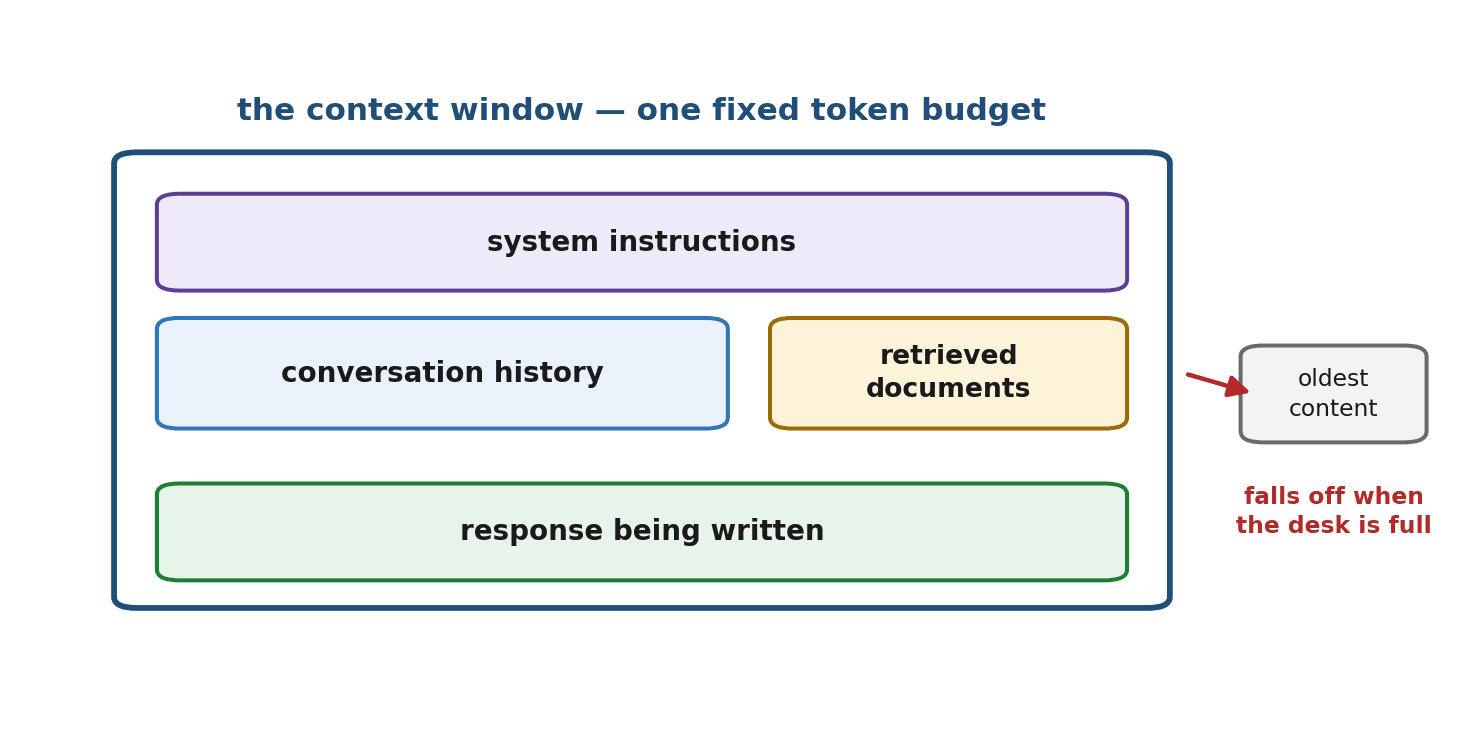
Now the central concept. The context window is the maximum number of tokens a model can consider at once. It is measured in tokens (recall Chapter 11), and — this is the part beginners often miss — everything must fit inside it together: the system instructions, the entire conversation history, any documents you have provided, and the response the model is currently generating. All of it shares one fixed budget.
If a model has a context window of, say, 100,000 tokens, then the sum of your instructions, the back-and-forth so far, your pasted documents, and the answer being written cannot exceed that number. The context window is the model's working memory — and like all working memory, it is finite.
The Desk Analogy
Picture the context window as a desk of fixed size. Everything the model is currently working with has to lie on that desk at the same time: the note of instructions, the pages of conversation, the reference documents, and the sheet it is writing its answer on. A bigger desk lets you spread out more material, but every desk has edges. When the desk is full and you want to add something new, something already on it has to come off to make room. The model cannot work with anything that is not on the desk.
What Happens When You Run Out
Exceeding the context window is not a rare edge case; in long conversations and document-heavy tasks it is the normal state of affairs. Three things can happen, and each matters.
- The request is rejected or truncated. If you try to send more tokens than the window allows, the model either refuses the request or silently cuts off part of your input — and a silent cut is dangerous, because the model may be missing information you assumed it had.
- The model 'forgets' the earliest parts. In a long running conversation, once the total exceeds the window, the oldest messages fall off the desk. The model genuinely cannot see them anymore, which is why a long chat can seem to forget what you said at the start.
- Information in the middle gets overlooked. Even when everything fits, models tend to pay closest attention to the beginning and end of a long context, and can overlook details buried in the middle. This well-documented effect is often called being "lost in the middle."
Bigger Windows Are Not a Free Lunch
Context windows have grown enormously, and it is tempting to conclude that the problem has simply gone away — just paste everything in. Resist that temptation. Even with a huge window, three costs remain. The quadratic growth means long contexts are slower and more expensive to process. The lost-in-the-middle effect means quality can actually degrade when you stuff in too much irrelevant material. And you are paying, per token, for everything you include whether the model uses it or not. A large context window is a tool to be used deliberately, not a license to be careless.
This is precisely the motivation behind retrieval. Rather than dumping an entire library onto the desk and hoping, you retrieve only the few most relevant pages — which is exactly what the RAG system in Chapter 36 does.
Strategies for Working Within the Window
Managing the context window is a craft, and a handful of strategies cover most situations. You have already met several of them in earlier chapters; here they come together.
- Retrieve, do not dump. Instead of pasting all your documents, use retrieval to fetch only the chunks relevant to the current question. This is the core idea of RAG (Chapter 36) and the single most powerful technique for staying within the window.
- Summarize old history. In a long conversation, periodically replace the early back-and-forth with a short summary. The desk keeps the gist while freeing space for new material.
- Position important content well. Put the most critical instructions at the very start or very end of the prompt, never buried in the middle, to work with the model's attention rather than against it.
- Trim the unnecessary. Remove redundant text, boilerplate, and irrelevant detail before sending. Every token you cut is space and money saved.
# Everything below shares one token budget -- the context window.
total = (count_tokens(system_instructions)
         + count_tokens(conversation_history)
         + count_tokens(retrieved_documents)
         + expected_response_tokens)

if total > context_window_limit:
    # Make room: retrieve less, summarize history, or trim inputs.
    ...
Why This Matters for Agents
For agents, the context window is not an occasional concern — it is a constant pressure. An agent works in a loop (Chapter 1), and with every step it accumulates more material: the original goal, its own reasoning, the tools it called, and the often-lengthy outputs those tools returned. A long-running agent can fill its context window quickly, and once it does, it begins to forget its earlier reasoning and observations.
Much of the engineering of capable agents is, at heart, context management: deciding what to keep on the desk, what to summarize, what to store elsewhere and retrieve only when needed. The memory systems of Chapter 34 and the retrieval of Chapter 36 exist largely to manage this one constraint. Keep the desk analogy in mind throughout the rest of the book; it will explain a great many design decisions.
Summary
Attention works by comparing every token with every other token, which makes it powerful but causes its cost to grow with the square of the length — the reason long contexts are slow and expensive. When generating, models attend only backward, producing text one token at a time. The context window is the fixed, token-measured budget that must hold the instructions, history, documents, and response all at once — the model's desk. Exceeding it causes rejection, forgetting of the oldest content, or overlooking of the middle. Bigger windows help but are not free, which motivates retrieving rather than dumping, summarizing history, positioning key content at the edges, and trimming the rest. For agents, which accumulate long histories, this management is a central, ongoing task.
We now understand how a trained model reads and reasons over text. Chapter 13 steps back to ask where that trained model comes from in the first place — how an LLM is pretrained at staggering scale on the simple task of predicting the next token.
Exercises
- 1Explain, in your own words and with a fresh analogy of your own, what the context window is and why everything — instructions, history, documents, and the answer — has to share it.
- 2Attention cost grows with the square of the length. If a 500-token prompt takes a certain amount of attention work, roughly how much more work does a 2,000-token prompt take? Show your reasoning.
- 3Describe three distinct things that can go wrong when a conversation or document exceeds the context window, and give a one-line consequence of each.
- 4List the four strategies from this chapter for staying within the context window, and for each, name the earlier chapter where you first met the underlying idea (where applicable).
- 5Explain why the 'lost in the middle' effect means you should not simply paste a huge document and trust the model to find the relevant part. What should you do instead?
- 6An agent has been running for many steps and starts ignoring its original goal. Using the desk analogy, explain what has likely happened and suggest two concrete fixes.