
Chapter 39Building a Single Agent with LangGraph
Time to build. In this chapter we take one framework — LangGraph — and use it to construct a complete single agent, turning the loop you already know into an explicit, controllable graph. LangGraph represents an agent as a graph of steps, which makes its control flow visible and easy to shape, and it is an excellent vehicle for understanding how a real framework organizes an agent. The code here shows the *shape* of LangGraph rather than its exact, ever-changing API, so the lessons transfer even as details evolve; always check the current documentation when you build for real.
Why a Graph?
In the raw loop of Chapter 31, the agent's control flow was implicit — buried inside the loop's logic. LangGraph makes it explicit by modeling the agent as a graph: the steps become nodes, and the ways of moving between steps become edges. The benefit is visibility and control. You can see exactly how your agent moves from reasoning to acting and back, add steps in the middle, branch on conditions, and reason about the flow as a diagram rather than tracing it through code. For complex agents, this explicitness is a real advantage.
Nodes, Edges, and State
A LangGraph agent has three ingredients, all of which map onto things you already understand.
- State — the data that flows through the graph: the goal, the conversation, the tool results. This is exactly the agent's state from Chapter 31, made an explicit object the nodes read and update.
- Nodes — functions that do work and update the state. A 'reason' node calls the model; a 'tool' node runs a tool.
- Edges — the connections that decide which node runs next. A conditional edge branches based on the state — for example, 'if the model asked for a tool, go to the tool node; otherwise, finish.'
The Classic Agent Graph
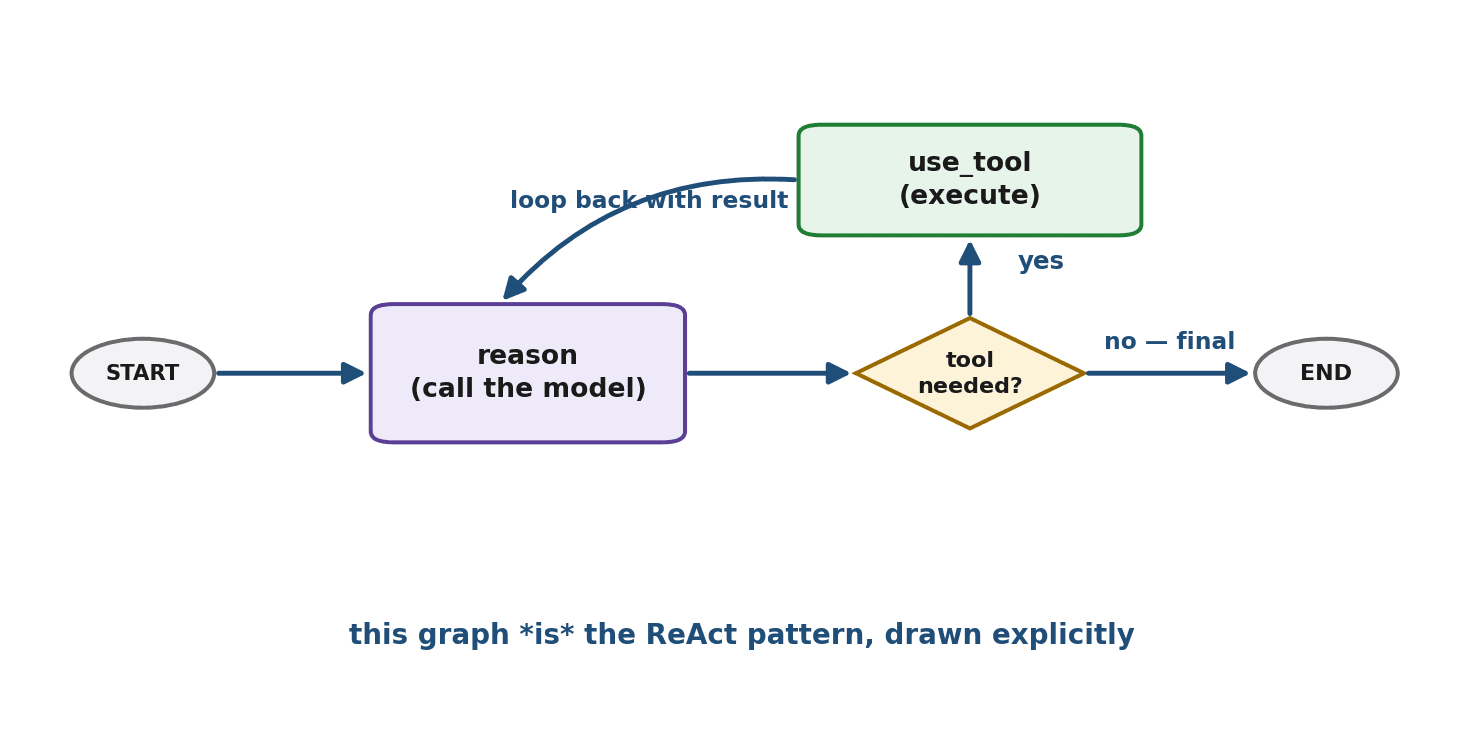
The canonical agent graph has a beautifully simple shape, and you will recognize it instantly. A reason node calls the model. A conditional edge then checks the model's decision: if it wants to use a tool, go to a tool node, run the tool, and loop back to reason with the result; if it gave a final answer, go to the end. That loop — reason, maybe act, observe, reason again — is the ReAct pattern from Chapter 32, now drawn as an explicit graph. The framework has not invented a new idea; it has given a familiar one a clear visual structure.
Building It Step by Step
Let us assemble that graph. We define the state, write the two nodes, wire the conditional edge, and compile. The code shows LangGraph's shape; treat names as illustrative.
# 1. The state: what flows through the graph (the agent's history).
class State(TypedDict):
    messages: list

# 2. The 'reason' node: call the model, which may request a tool.
def reason(state):
    reply = model_with_tools(state["messages"])
    return {"messages": state["messages"] + [reply]}

# 3. The 'tool' node: run whatever tool the model requested.
def use_tool(state):
    result = run_requested_tool(state["messages"][-1])
    return {"messages": state["messages"] + [result]}

# 4. The conditional edge: where do we go after reasoning?
def route(state):
    return "use_tool" if wants_a_tool(state["messages"][-1]) else "END"

# 5. Wire the graph together.
graph = Graph(State)
graph.add_node("reason", reason)
graph.add_node("use_tool", use_tool)
graph.add_conditional_edge("reason", route)   # reason -> tool or END
graph.add_edge("use_tool", "reason")          # after a tool, reason again
agent = graph.compile()

print(agent.run({"messages": [user("What's 23 - 8 + 12?")]}))
Read the wiring: after reason, the conditional edge sends us to use_tool or to the end; after use_tool, we always loop back to reason. That cycle is the agent. The framework handled the loop bookkeeping; you described the flow.
Why the Graph Helps
With the flow made explicit, complex agents become manageable. You can insert new nodes — a validation step, a human-approval gate, a logging stage — at precise points. You can branch in sophisticated ways. You can visualize the whole agent as a diagram, which is invaluable for understanding and debugging. And you can handle errors per-node rather than wrapping everything in one big try-block. For a simple agent this is overkill, but as logic grows, the graph keeps it comprehensible where a tangled loop would not.
Adding a Checkpoint
Because the state is an explicit object, LangGraph can checkpoint it — save the agent's state at each step so the agent can pause and resume. This unlocks important behaviors: an agent can stop to wait for human input and continue later, or survive a crash and pick up where it left off, or let a user step in mid-task. You enable checkpointing when you compile the graph, and the framework persists the state for you. For long-running or human-in-the-loop agents, this is a major convenience.
Adding Another Tool
Extending the agent with more tools is straightforward: you give the model additional tools to choose from (Chapter 33), and the existing graph handles them without change — when the model requests any tool, the use_tool node runs it. The model picks among the tools based on their descriptions (Chapter 33), and the graph's loop accommodates as many tools as you provide. The structure scales gracefully because the routing logic is about whether a tool was requested, not which one.
When the Graph Is Overkill
Keep perspective. For a simple agent — one model, one or two tools, a straightforward loop — the raw loop from Chapter 31 is simpler, clearer, and has no dependencies. The graph framework earns its place when control flow gets genuinely complex: many branches, human-in-the-loop steps, intricate state, or the need to visualize and persist the flow. As Chapter 38 advised, reach for the graph when you feel the pain a graph solves, not before.
Summary
LangGraph models an agent as a graph, making its control flow explicit through state (the data flowing through), nodes (functions that do work), and edges (transitions, including conditional ones that branch on state). The classic agent graph — a reason node, a conditional edge to a tool node, looping back — is simply the ReAct pattern drawn explicitly. The graph form makes complex agents manageable: you can insert nodes, branch, visualize, handle errors per-node, and checkpoint the state to pause, resume, or add human input. Adding tools is easy and the structure scales. For simple agents the raw loop is still better; the graph earns its place when flow grows complex. And underneath, it is all the concepts you already built by hand.
Our agent can now use tools, but each tool has been wired up by hand. Chapter 40 introduces the Model Context Protocol — a standard that lets agents connect to tools and data the way a universal port connects devices, dramatically reducing the integration work.
Exercises
- 1Explain the difference between the implicit control flow of a raw loop (Chapter 31) and the explicit control flow of a graph. What advantage does making the flow explicit give you?
- 2Define, in your own words, the three ingredients of a LangGraph agent — state, nodes, and edges — and map each one to a concept from Part VII.
- 3Draw or describe the classic agent graph, and explain why it is equivalent to the ReAct pattern from Chapter 32.
- 4Build a simple graph-based agent (using LangGraph or by sketching the nodes and edges) that answers questions using a single search tool. Trace how the state changes as it runs.
- 5Explain what a checkpoint is and give two concrete situations where the ability to pause and resume an agent would be valuable.
- 6Describe how you would add a second tool to the agent, and explain why the graph's structure does not need to change to accommodate it.