
Chapter 40The Model Context Protocol (MCP)
As you connect agents to more and more tools and data sources, a quiet problem emerges: every connection is custom, one-off wiring. The Model Context Protocol, or MCP, is the standard that solves this — a universal way for agents to plug into tools and data, much as a single port lets any device connect to any computer. MCP has gone from a niche idea to a widely adopted standard in a remarkably short time, and understanding it is increasingly essential for building real agents. This chapter explains what MCP is, why a standard matters so much, and how to use and build with it.
The Problem MCP Solves
Recall from Chapter 33 that tools are how agents act, and that you write each tool yourself. Now imagine an agent that needs to reach a dozen different systems — your files, a database, a calendar, a code repository, a customer-support system. Without a standard, each connection is bespoke: custom code to talk to each system, in its own way, maintained separately. As the number of tools and agents grows, this becomes an unmanageable tangle of one-off integrations. Every new tool means new custom wiring, and every new agent must re-implement connections to the tools it needs.
What MCP Is
MCP — the Model Context Protocol — is an open standard for connecting AI agents to external tools and data sources. Instead of custom wiring for each tool, a tool exposes itself through MCP in a standard way, and any MCP-capable agent can use it without bespoke code. The analogy that captures it best is USB. Before USB, every device had its own connector and its own cable; after USB, one standard port accepts them all. MCP is USB for AI tools: one standard connector between agents and the capabilities they need.
Clients and Servers
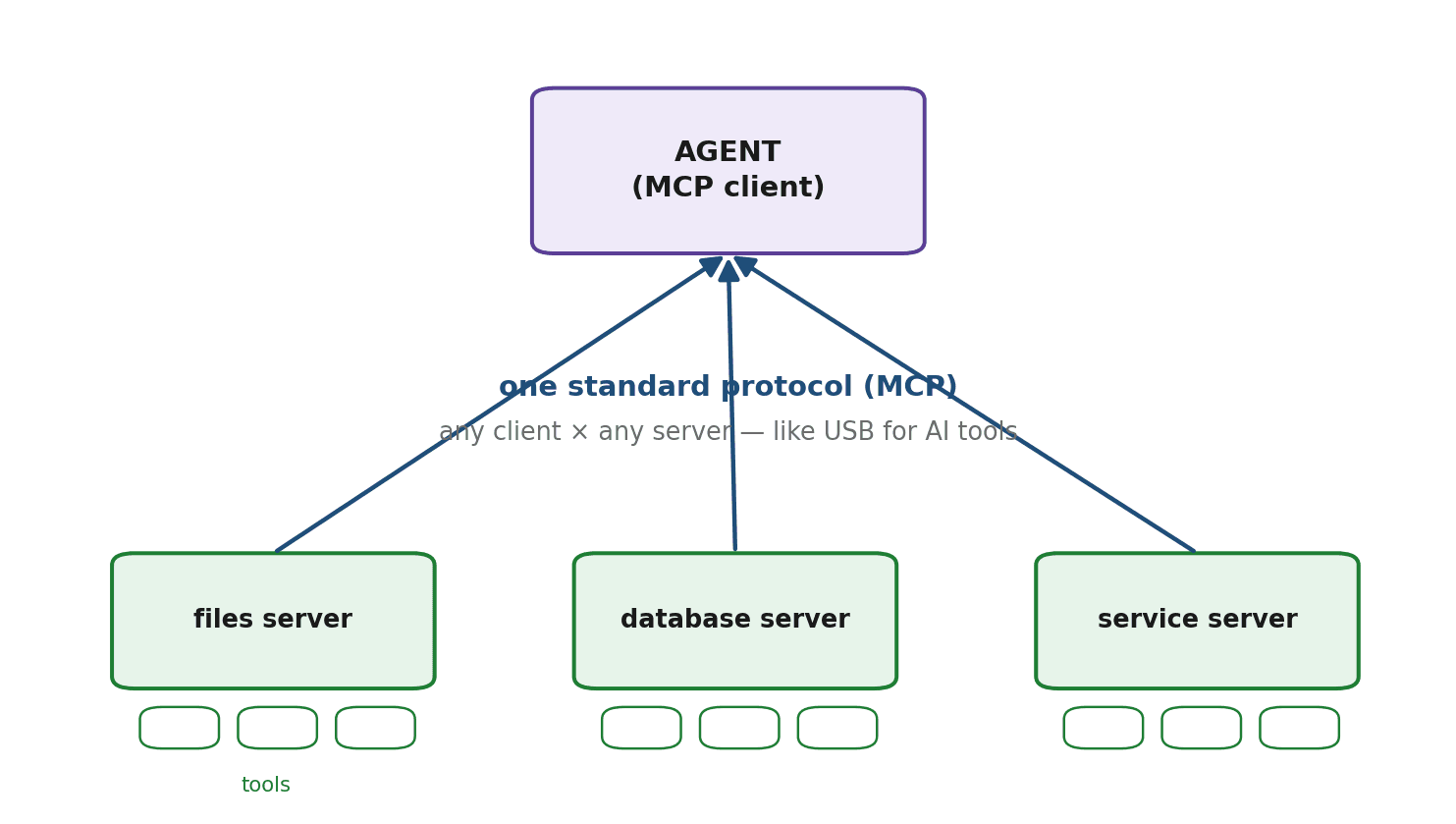
MCP works through two roles. An MCP server exposes tools and data — you might have one server for your files, another for a database, another for a particular service. An MCP client is your agent, which connects to one or more servers and uses the tools they expose. The protocol is the shared language between them. Because the interface is standard, you can mix and match freely: many servers, many clients, all speaking MCP. A server you write works with any client; a client you write works with any server.
Why a Standard Matters
The power of MCP is the power of any good standard, and it is worth dwelling on. Return to USB: its value was not any single feature but the fact that everyone agreed on it, so a device built once worked everywhere. MCP brings the same network effect to agent tools. Write a tool once as an MCP server, and any agent can use it. Build an agent once as an MCP client, and it can use any MCP tool. Integrating a new capability drops from a custom engineering project to a matter of configuration — pointing your agent at a server. As a shared ecosystem of MCP servers grows, agents gain access to an ever-widening world of tools without anyone writing bespoke glue. That compounding is why MCP matters far beyond convenience.
Using an Existing MCP Server
The most common thing you will do is connect your agent to a server someone else has built. Your agent, as a client, connects to the server, discovers the tools it offers, and calls them — all through the standard protocol. The shape looks like this.
# Connect your agent (the client) to an existing MCP server.
client = MCPClient()
client.connect("files-server")          # point at a server; no custom wiring

tools = client.list_tools()             # discover what the server offers
print(tools)                             # e.g. ["read_file", "list_directory"]

# Call one of its tools -- just like any other tool from Chapter 33.
result = client.call_tool("read_file", {"path": "notes.txt"})
Notice that once connected, an MCP tool behaves like any tool from Chapter 33 — your agent's tool-calling loop uses it exactly the same way. MCP standardizes how the tool is discovered and connected, not how the agent fundamentally works.
Building a Simple MCP Server
Exposing your own capability as an MCP server is just as approachable: you define a tool — the same name, description, and function from Chapter 33 — and run it as a server speaking the protocol. Now any MCP client can use it.
server = MCPServer("weather-server")

@server.tool(description="Get the current weather for a city.")
def get_weather(city: str):
    return f"Currently 14C and cloudy in {city}."

server.run()    # now any MCP-capable agent can discover and call get_weather
That is the whole idea in miniature: a tool you already know how to write, wrapped so the world can plug into it. Write it once, and every MCP agent can use it.
How MCP Fits the Agent
It is worth being clear that MCP does not change what an agent is. MCP tools are still tools (Chapter 33), and the agent still uses them through the tool-calling mechanism (Chapter 29) inside its loop (Chapter 31). MCP is plumbing — a standard way to discover and connect tools — not a new agent concept. This is good news: everything you learned about tools, loops, and reasoning applies unchanged, and MCP simply makes connecting those tools dramatically easier.
Why MCP Matters for the Ecosystem
MCP has become a genuine standard, and the consequence is an explosion of ready-made MCP servers for all sorts of services and data sources. For you as a builder, this means your agents can plug into a growing universe of capabilities with little or no custom code — connect to a server and the tools are simply there. This network effect is reshaping how agents are built: less time spent on bespoke integrations, more time on the agent's actual purpose. Being fluent in MCP is fast becoming part of the basic toolkit of agent building.
Security with MCP
Connecting to external servers and tools is, of course, a risk surface — the same concern raised in Chapter 33 and explored in Chapter 45. When your agent connects to an MCP server, it is trusting that server's tools to behave well and handle data responsibly. Connect only to servers you trust, be mindful of what data flows to them, validate what comes back, and apply the least-privilege principle. The convenience of plugging in easily must be balanced by care about what you are plugging into.
Summary
MCP, the Model Context Protocol, is an open standard for connecting agents to external tools and data — USB for AI tools, replacing bespoke one-off integrations with a universal connector. It works through MCP servers that expose tools and MCP clients (your agents) that connect to them, all speaking one protocol so any client works with any server. The value is the network effect of a standard: write a tool once and any agent can use it, build an agent once and it can use any MCP tool, turning integration from custom engineering into configuration. MCP tools are ordinary tools used through the normal agent loop — MCP just standardizes discovery and connection — and a fast-growing ecosystem of servers means agents can plug into a widening world of capabilities, balanced by the need to connect only to servers you trust.
We have given a single agent powerful, standardized access to tools. Chapter 41 explores what happens when you use several agents together — multi-agent systems, where specialized agents collaborate to solve problems too big for one.
Exercises
- 1Explain the problem MCP solves, using the tangle of custom integrations as the starting point. Why does this problem get worse as the number of tools and agents grows?
- 2Explain the USB analogy for MCP in your own words. What is the 'network effect' that makes a standard so valuable?
- 3Describe the roles of an MCP client and an MCP server, and explain how the standard lets any client work with any server.
- 4Connect an agent (real or sketched) to an existing MCP server, list its tools, and call one. Explain how, once connected, the tool is used just like any other tool from Chapter 33.
- 5Write a minimal MCP server that exposes a single tool of your choice. Explain why writing it once means any MCP-capable agent can use it.
- 6Describe two security considerations when connecting your agent to MCP servers, and explain why easy connection does not mean safe connection.