
Chapter 49Capstone 1: A Research Assistant Agent
You have learned every piece of agent building; now you put them together. The capstones are projects — complete agents you build end to end, applying the concepts from across the book. Our first capstone is a research assistant: give it a question, and it searches the web, reads sources, and produces a clear summary with citations. As we build, watch how naturally the pieces from earlier chapters click into place. The goal is not just a working agent but the satisfying realization that you already know how to make one.
What We're Building
Our research assistant takes a question like "What are the main health benefits of regular walking?", searches for relevant information, reads what it finds, and returns a concise, well-organized summary in which every claim is backed by a citation to its source. To do this it needs to search, to read pages, to reason about what it has found, and to track where each fact came from. Every one of those capabilities is something you have already built.
Design: Mapping to What You Know
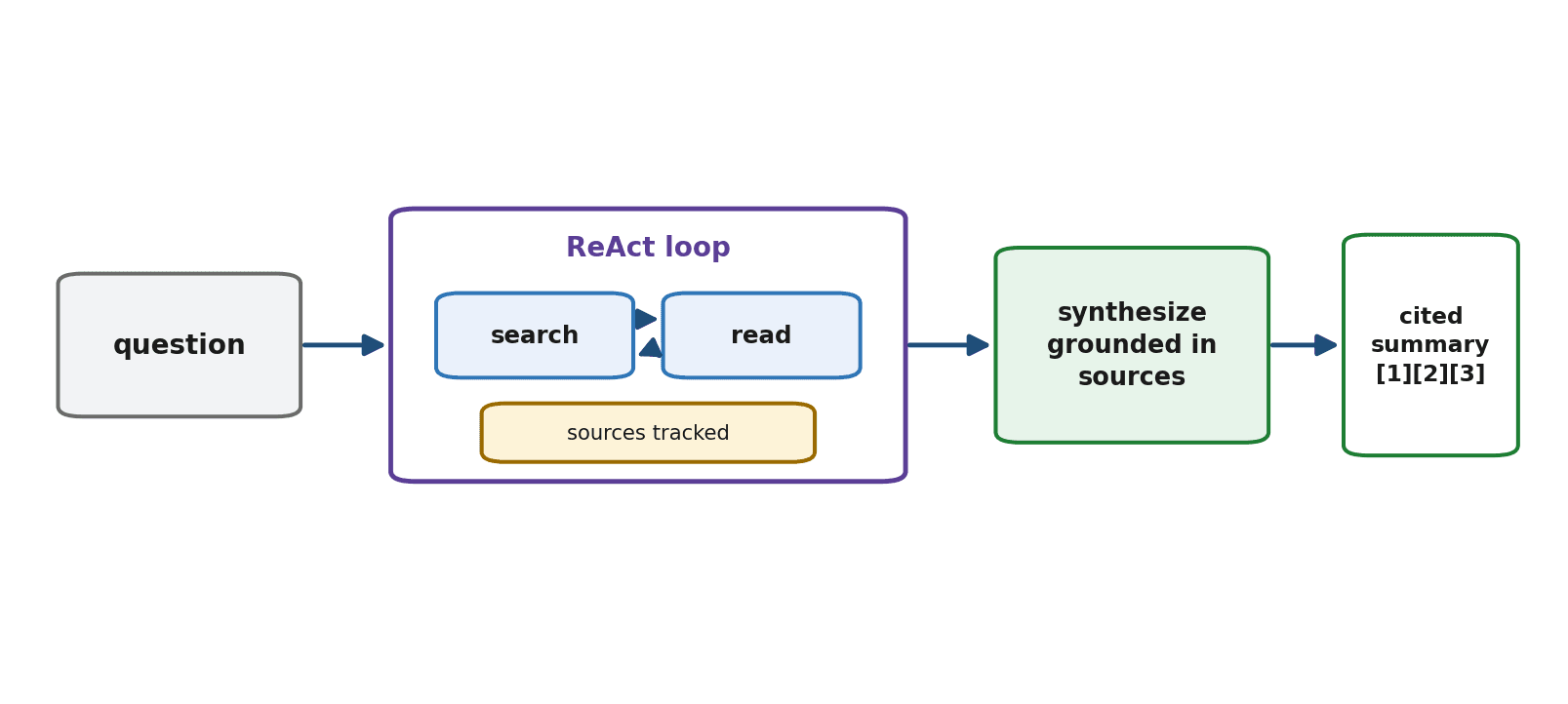
Before writing code, we map the agent to concepts from the book. At its heart is the agent loop (Chapter 31) running the ReAct pattern (Chapter 32) — reason, search, read, repeat. It uses web tools (Chapter 42) to search and fetch. It will track sources so it can produce citations. And it finishes with a synthesis step that writes the cited summary. Nothing here is new; the capstone is composition.
Step 1: The Tools
We give the agent two web tools (Chapter 42): one to search and one to read a page, each returning a result the agent can reason over and remembering the source.
sources = []     # we record every source the agent reads, for citations

def search(query):
    results = web_search(query)            # returns a list of {title, url, snippet}
    return [{"title": r["title"], "url": r["url"]} for r in results[:5]]

def read(url):
    text = fetch_and_clean(url)            # download and clean the page
    sources.append(url)                    # remember this source
    return summarize(text, max_words=400)  # extract, don't flood the context (Ch 12)

tools = [
    {"name": "search", "description": "Search the web for a query.",
     "parameters": {"query": "what to search for"}},
    {"name": "read", "description": "Read and summarize a web page by URL.",
     "parameters": {"url": "the page URL"}},
]
Step 2: The Agent Loop
The agent runs the ReAct loop from Chapter 32: it reasons about what to search, reads promising results, and continues until it has enough to answer — all bounded by a step limit (Chapter 31).
def research(question, max_steps=8):
    history = [{"role": "system", "content":
                "Research the question by searching and reading sources. "
                "When you have enough, write a summary citing your sources."},
               {"role": "user", "content": question}]
    for _ in range(max_steps):
        step = model_respond(history, tools)        # REASON
        if step.has_final_answer:
            return step.final_answer
        result = run_tool(step.tool, step.args)       # ACT: search or read
        history.append({"role": "assistant", "content": step.text})
        history.append({"role": "user", "content": f"Result: {result}"})
    return synthesize(history)                          # if we hit the limit, summarize
Step 3: Tracking Sources for Citations
Notice that the read tool already appends each URL to the sources list. That simple bookkeeping is what makes citations possible: by the time the agent writes its summary, we have a record of every source it consulted, ready to attach. Tracking provenance as you go is far easier than reconstructing it afterward.
Step 4: Producing the Cited Summary
The final step asks the model to synthesize what it learned into a clear summary and to ground each claim in the sources gathered — the same grounding discipline as RAG (Chapter 36), now applied to freshly researched material.
def synthesize(history):
    prompt = ("Write a clear, well-organized summary answering the question, "
              "based only on what was found. Cite sources by number. "
              f"Sources: {list(enumerate(sources, 1))}")
    return model_respond(history + [{"role": "user", "content": prompt}]).text
Step 5: Putting It Together
That is the whole agent. You call research(question), it loops through searching and reading, tracking sources as it goes, and returns a cited summary.
answer = research("What are the main health benefits of regular walking?")
print(answer)
# The agent searches, reads a few sources, then returns a summary
# with claims cited to the sources it actually read.
Testing and Evaluating
Apply the discipline of Chapter 44: run the agent on several real questions and inspect its behavior. Are the citations real and relevant? Is the summary accurate and grounded, or did it drift into invented claims? Did it search sensibly and avoid loops? Build a small eval set of questions with criteria, and trace runs that disappoint you. This verification is what turns a promising demo into something you would actually rely on.
Extending It
Once the core works, the rest of the book suggests natural extensions. Add memory (Chapter 34) so it remembers a user's interests across sessions. Add RAG over your own documents (Chapter 36) so it can research private material, not just the web. Add guardrails (Chapter 45) to handle untrusted page content safely. And deploy it (Chapter 47) as a service. Each extension is a chapter you have already read, applied to a real project.
Summary
This capstone composed a research assistant from pieces you already knew: a ReAct loop (Chapter 32) bounded for safety (Chapter 31), web search-and-read tools that extract rather than flood (Chapter 42 and 12), source tracking for citations, and a grounded synthesis step (Chapter 36). You tested and evaluated it (Chapter 44) and saw clear paths to extend it with memory, private retrieval, guardrails, and deployment. The deeper lesson is that a capable agent is not a single trick but a thoughtful composition of fundamentals — and you can now do that composition yourself.
Our next capstone raises the stakes: a coding agent that reads code, makes changes, and runs tests — connected to real developer tools through MCP, and held in check by the safety practices of Chapter 45.
Exercises
- 1Build the research agent from this chapter (using real or simulated web tools) and run it on a question of your choice. Inspect the steps it took.
- 2Make sure every claim in the output is backed by a citation to a source the agent actually read. Verify that the cited sources genuinely support the claims.
- 3Write your own short summary of the same question, then compare it to the agent's. Where does the agent do well, and where does it fall short?
- 4Add a trace (Chapter 44) to the agent and run it on a hard, multi-part question. Read the trace and describe how it searched and read its way to an answer.
- 5Extend the agent with one capability from the book — memory, private-document RAG, or a guardrail — and describe how it changes the agent's behavior.
- 6Build a small evaluation set of research questions with criteria for a good answer, and use it to measure how reliably your agent produces accurate, well-cited summaries.