
Chapter 50Capstone 2: A Coding Agent with MCP
Our second capstone is more ambitious and more dangerous: a coding agent that reads a codebase, makes a change, runs the tests, and reports the result — connected to real developer tools through MCP (Chapter 40), and kept safe by the guardrails of Chapter 45. Coding agents are among the most useful and most popular agents being built today, and they bring together tool use, code execution, MCP, and safety in a single project. Because this agent touches files and runs code, safety is not a footnote here; it is woven through every step.
What We're Building
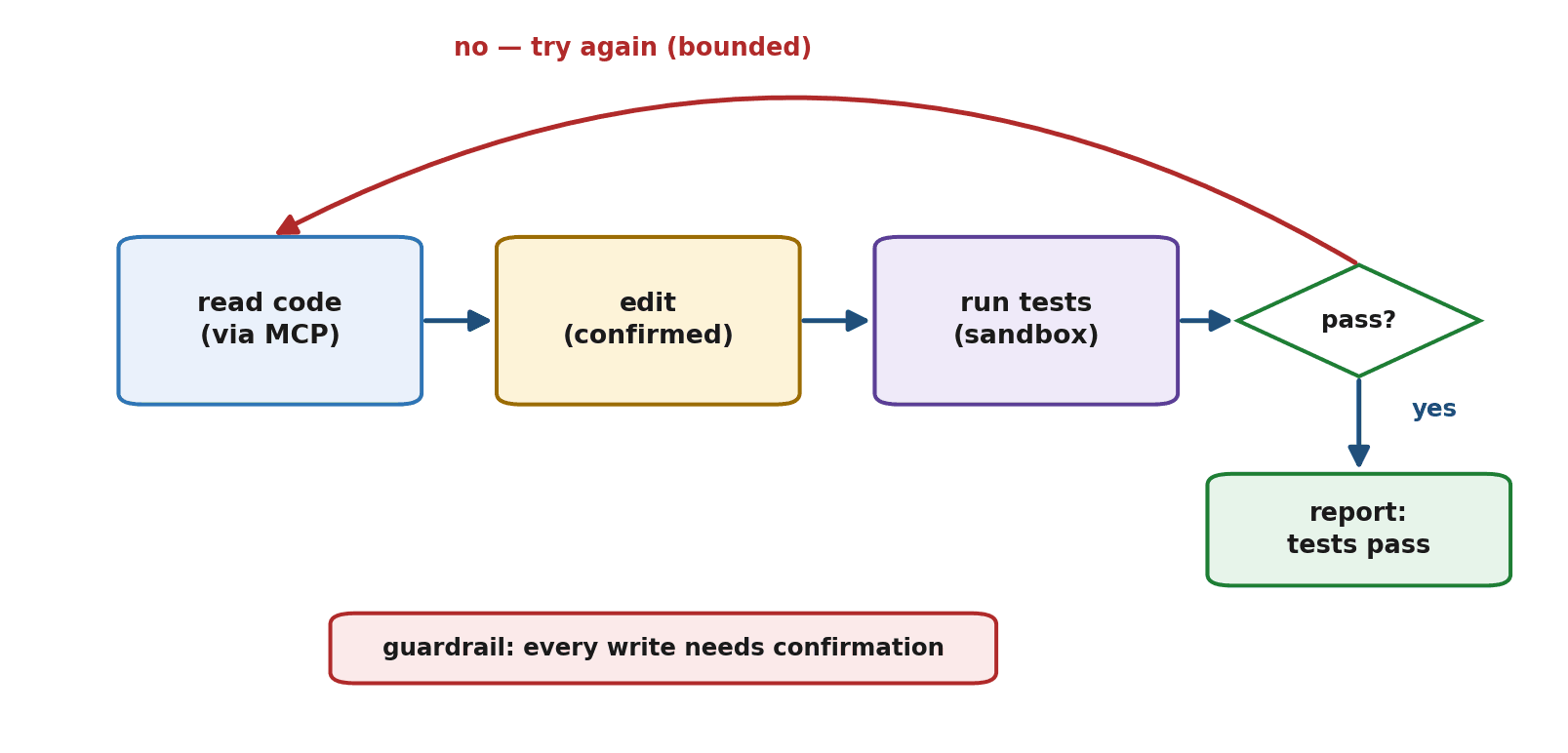
Give the agent a goal like "fix the failing test in the calculator module," and it will read the relevant code, reason about the bug, make an edit, run the test suite, and report whether it passed — looping to try again if it did not. It needs to read and write files, run tests, and do so without ever damaging anything it should not touch. That last requirement makes this capstone as much about restraint as capability.
Design
The components are familiar. An agent loop with ReAct reasoning (Chapters 31 and 32) drives it. File access via MCP (Chapter 40) lets it read and write code through a standard connection. A sandboxed test runner (Chapter 42) lets it run tests without endangering your system. And safety guardrails (Chapter 45) ensure it never makes destructive changes unsupervised. The novelty over Capstone 1 is the real-world power — and therefore the real-world risk — of touching code.
Step 1: Connecting to Files via MCP
Rather than wiring up file access by hand, we connect to a file server through MCP (Chapter 40), giving the agent standardized read and write tools — and, crucially, scoping that server to a single project directory (Chapter 42) so the agent cannot roam.
client = MCPClient()
client.connect("files-server", root="/project")   # scoped to one directory only

def read_file(path):
    return client.call_tool("read_file", {"path": path})

def write_file(path, content):
    return client.call_tool("write_file", {"path": path, "content": content})
Step 2: Running Tests Safely
The agent needs to run the test suite to know whether its change worked — but running code is the most dangerous tool of all (Chapter 42), so it runs only inside a sandbox with no access to the network or the wider system.
def run_tests():
    # Run the test suite inside a locked-down sandbox: no network,
    # no access outside the project, strict time limit (Chapter 42).
    return sandbox.run("pytest", cwd="/project", timeout=30, network=False)
Step 3: The Agent Loop
The loop is ReAct (Chapter 32): read the code, reason about the fix, write the change, run the tests, observe the result, and either finish (tests pass) or try again (tests fail) — bounded by a step limit so it cannot thrash forever.
def coding_agent(goal, max_steps=8):
    history = [{"role": "system", "content":
                "Read the code, fix the bug, and run the tests. "
                "Repeat until the tests pass or you run out of steps."},
               {"role": "user", "content": goal}]
    for _ in range(max_steps):
        step = model_respond(history, tools=[read_file, write_file, run_tests])
        if step.has_final_answer:
            return step.final_answer
        result = guarded_execute(step.tool, step.args)   # guardrails (Step 4)
        history.append({"role": "user", "content": f"Result: {result}"})
    return "Stopped: could not fix it within the step limit."
Step 4: Safety Guardrails
This is the heart of a coding agent done responsibly. Reads and test runs are relatively safe, but writes change your code and could do damage, so they pass through a guardrail — a confirmation gate (Chapter 45), or at minimum a check that confines changes to the project and refuses anything destructive like deleting files.
def guarded_execute(tool, args):
    if tool == write_file:
        if not confirm_change(args["path"], args["content"]):   # human or policy check
            return "Change blocked: not confirmed."
return tool(**args) # reads and test runs proceed; writes need approvalStep 5: Putting It Together
Assembled, the agent reads the failing code, proposes a fix, has the write confirmed, runs the tests in its sandbox, and reports the outcome — looping until the tests pass.
result = coding_agent("Fix the failing test in the calculator module.")
print(result)
# The agent reads the code, edits it (with the write confirmed),
# runs the sandboxed tests, and reports that they now pass.
Testing It
Try it on a real, contained problem: a module with one deliberately failing test and a small bug. Confirm the agent fixes the bug and the test passes — and, just as importantly, that it does not break other tests or wander outside the project. Trace its run (Chapter 44) to see how it reasoned, and watch the guardrails do their job on the write step. A coding agent that passes the target test but breaks three others has not succeeded.
Extending It
Natural extensions, all drawn from the book, include connecting to version control so the agent can review and commit changes, giving it more tools (search the codebase, run a linter), letting it handle changes across multiple files, and tightening the guardrails further for use on real projects. Each step increases capability — and demands a corresponding increase in caution, exactly the balance of Chapter 42.
Summary
This capstone built a coding agent that reads code, edits it, and runs tests in a loop, connecting to files through MCP (Chapter 40) and running tests in a sandbox (Chapter 42). Its defining feature is safety: file access scoped to one directory, code execution sandboxed, and writes gated behind a confirmation guardrail (Chapter 45), because an agent that touches code can do real harm. You tested it on a contained bug, traced its reasoning, and saw paths to extend it — always paired with matching caution. The lesson is that real-world power and careful guardrails are inseparable, which is precisely what responsible agent building means.
Our final capstone is the grandest: a multi-agent workflow where a team of agents plans, executes, and reviews a task together — combining nearly every concept in the book into one system.
Exercises
- 1Build a small coding agent that can read a file, edit it, and run a test (using a sandbox or a safely isolated environment). Have it fix a single deliberately failing test.
- 2Connect your agent's file access through MCP (or a scoped file tool), confined to a single project directory. Verify it cannot read or write outside that directory.
- 3Add a guardrail that requires confirmation before any write, and demonstrate it allowing an approved change and blocking an unapproved one.
- 4Give your agent a bug to fix, then check not only that the target test passes but that no other tests broke. Why is this second check essential?
- 5Trace a run of your coding agent (Chapter 44) and describe how it reasoned from reading the code to fixing the bug and confirming the tests pass.
- 6Describe two ways you would extend the coding agent and, for each, the additional guardrail you would add to keep the new capability safe.